contents
Workflow Discussion 2025 — a Digest
— 2026-07-27 —
This page is based on the extended design discussion, conducted throughout
2025 (and continuing), between Wouter Verwijlen and Hermann Voßeler (Ichthyo).
The goal of this discussion is to establish the foundations of a Workflow Concept
for the Lumiera video editing application. A digest and an summary is presented here,
based on the original eMail messages, IRC logs and published documents,
and was compiled to present the outcomes of the exchange, the insights,
agreements and outstanding issues identified during this discussion in
a format that will remain accessible in the long term.

|
Knowledge-Technology (»AI«) was used to identify topics of the discussion and to create an initial clustering of quotes and arrangement of arguments. These were then rearranged, reweighed and reformulated by recourse to the original messages and IRC logs. |
Overview
The starting point and anchor for this discussion is the »Lumiera Workflow Proposals« document contributed by Wouter, to analyse how contemporary editing applications handle the central tasks of film editing — leading to proposals how this handling might be improved. This document grew in parallel to the discussion and was treated by both participants as part of the discussion: the proposals it contains are contributions by Wouter, based on his yearlong experience as a documentary filmmaker — and several of them were picked up, challenged and refined in the ensuing exchange of thoughts and insights, that is documented here.
The discussion itself was conducted mostly through long eMail threads, complemented by IRC chat sessions (only partially recorded), and by an in-person meeting at FrOSCon-2025 in St.Augustin, where Benny Lyons also participated.
| period | thread | character |
|---|---|---|
March 2025 |
re-establishing contact |
Wouter offers concept work; first version of the Proposals document |
April 2025 |
»Workflow and Structure« |
first deep dive: Placements, keybindings, grouping, gear switch |
2025-04-16 |
IRC chat |
placements in practice, sticky selection, trimming, keyboard navigation |
June 2025 |
document update |
Workflow Proposals chapter 2 (timeline) completed |
2025-08-17 |
FrOSCon-25 meeting |
in-person discussion; see → summary |
Aug…Dec 2025 |
»Workflow Discussion« |
second deep dive: placement prototypes, moving and adding clips |
March 2026 |
document update |
Proposals chapter 1 (source material) completed |
Structure of this digest
The material is arranged by topic, not chronologically — although within each topic thread, the argument is presented in the order it actually developed, through quotes attributed with author and date. Each topic thread closes with a status box stating what was agreed, what remains open, and what was postponed deliberately. Topics touch upon each other in many places; such connections are given as cross-references.
Quotes from eMails and chat have been lightly edited (typos, punctuation) for readability; the substance has been preserved verbatim. Some agreements were reached in unrecorded meetings and are marked as such.
In August 2025, Hermann proposed to organise the topic field into four areas, which also form the structure of this overview — preceded here by a section that explains the fundamentals and addresses overarching topics.
-
Control — control systems, command structure, navigation
-
Routing — default rules, layering, explicit wiring
-
Grouping — placements, grouping devices, ripple effects
-
Editing — build-up, (re)arrangement, trimming
The next question however is a tricky one: how can we structure the further discussion. This reminds me of Sergej Eisenstein’s »spherical book«. As you probably know, he always wanted to write a book about film montage, but he could not quite see how to accomplish this task, because he noticed that such a book must be “spherical”, because everything is connected to everything.
eMail 2025-08-24
— Hermann
— Hermann
Measured against this fourfold organisation, the discussion so far covered Grouping and Editing substantially, Control in one extended pass — while Routing was barely touched. This asymmetry originates from the way in which the discussion unfolded, and provides natural starting points for a follow-up.
· 🙞 🙜 ·
Cross-cutting Themes
Vision and common ground
The very first exchange already established a remarkable convergence regarding the aims.
Just read through your text and I’m under the impression that we’re both pretty much on the same page in many aspects — your approach, to look equally upon the usual way most editing applications handle some aspect, while also re-thinking how it should be done, from an experienced editor’s angle, seems to be spot on.
eMail 2025-03-31
— Hermann
— Hermann
Both participants share the desire to get away from conventional track management — the constant enabling, disabling and locking of tracks — whilst maintaining flexibility regarding the choice of method:
I think it could be worth it to try to achieve a trackless design, because I think not having to do track management will be a positive thing. However, I’m not necessarily against a track-based approach, so if we end up concluding that tracks, track numbers and track controls are ultimately more powerful and user friendly, then that’s what we should go for.
eMail 2025-04-06
— Wouter
— Wouter
We have both clearly stated the goal that we want to get rid of the conventional usage of tracks, i.e. we do not want to lock/unlock/enable/disable tracks all the time. And in addition to that, I personally also want to turn tracks into a fluid working space, especially by loosening the connection to the layering order […] to free up our usage of screen space within the arrangement of the edit in the timeline.
eMail 2025-08-24
— Hermann
— Hermann
A terminological note from Wouter also underpins this aspiration:
“Tracks” we associate with the likes of Avid and Premiere, which is why FCP rather speaks of “layers”, a term I also prefer to use, even if there’s no technical difference between the two.
eMail 2025-04-06
— Wouter
— Wouter
In other words: Wouter tends to use the term “tracks”, to imply not only the layering, but also the UI feature with buttons to enable/disable them, and further track controls.
Another shared conviction concerns the level of abstraction. Lumiera aims neither at a “magical” high-level feature set, nor at exposing raw building blocks:
If you ask people, how a really cool (computer based) drawing tool should work, then you’ll get two kinds of answers:
-
I want a tool which can read my mind and create a world-class drawing
-
I want a digital paintbrush / crayon / pencil, so that I can be “creative”
Yet in fact, a good digital drawing tool should rather be somewhere in the middle, like vector graphics with some additional supportive features. So that it is indeed still you who does the drawing, but the tool can amplify and support you, allowing you to move faster.
eMail 2025-04-07
— Hermann
— Hermann
This “medium level of abstraction” is a foundational principle from the Lumiera vision document; and it connects to a deliberate strategic choice: Lumiera is explicitly not conceived as a clone of existing commercial applications, and does not attempt to compete with industry-backed development on their terms:
Personally, I think it is a strategically important insight that a community-backed project should try to avoid competing with an industrial entity. […] Even if that means, that it can not look that “slick” than an industry backed solution can. I think, we need to find a way to be not industry-backed, and be proud of it.
eMail 2025-10-04
— Hermann
— Hermann
Wouter accepted this reasoning explicitly for the case discussed there (immediate live-update in response to UI, see → gestures), while insisting that immediacy of feedback is not mere polish but a genuine time-saver — a tension both participants agreed to resolve by clever design rather than raw computing power.
Flow and organic editing
The notion of »Flow« became the central yardstick of the whole discussion: UI concepts are judged by whether they sustain or interrupt the editor’s flow. Wouter formulated this pointedly:
I would like to share a few concerns that we might want to look into. The first one is “flow”. We previously talked about pursuing an organic way to edit. To me that means a number of things, for example, on a physical level: how do you use your hands and fingers while editing, to work smoothly, and to have a sense of tactility? On another level it means that I’d like most of my actions to be directly related to the most important clip interactions:
-
adding, removing or replacing clips
-
changing the duration of clips → trimming
-
changing the position of clips → arranging
-
splitting or merging clips
-
changing properties of clips
Anything that gets in the way of performing such actions causes an interruption of my flow. That sounds a bit overdramatic, but I do believe that if we have fewer of such interruptions, we’ll get a more organic flow, and this leads to an increased focus on storytelling. This would be a great goal to achieve! An example of an interruption is track selection: having to enable and disable tracks before performing an action (which is why I’m interested in trackless timelines).
eMail 2025-04-08
— Wouter
— Wouter
Hermann’s corresponding formulation approaches a similar idea from the side of perception and spatial cognition:
Especially I mean the space metaphor, i.e. thinking in locations, rooms, “close by”, “here and there”, up and down, left and right. As every editor knows, humans are quite good at picking up spatial cues and relations. And it’s often much easier to recall the context where you find some tool, than memorising it in an abstract, top-down classification scheme. […] And the overarching idea is that we want the software to be an extension of our body, so that we’re able to be “in” the material we’re working with.
eMail 2025-04-02
— Hermann
— Hermann
The flow criterion recurs throughout: expand/collapse cycles are interruptions (see → timeline sections); modes must be entered and exited fluidly (see → tools and modes); and a coherent gesture vocabulary should let the work become “similar to kind of a dance” (Hermann, eMail 2025-04-23; see → keybindings).
Target audience: the personas
In the »Workflow Proposals«, Wouter identified six groups of users who would most likely be attracted to Lumiera and its goals. This topic carried considerable weight in the discussion at the FrOSCon-25 conference, even while agreement was reached quickly:
-
the highly specialised editor working in an environment where the various parts of post-production are handled by different people (assistant editors, colourists, audio engineers, …)
-
the all-round contract editor handling all aspects of post-production
-
the all-round artistic filmmaker who also edits
-
the all-round social media creator, relying on visual effects, motion graphics and sound effects
-
the free-flowing editor without a fixed idea of the edit, exploring the footage, moving things around, not working in a linear fashion
-
the editor who has the film already cut in their head, progressing through structured and precise steps towards a clear vision
At FrOSCon, Benny proposed to order these groups by expected affinity; the discussion identified the first group (the specialist in an industrial work environment) and the social media creators as the more challenging audiences, since both require rather specialised tools. The groupings are understood as provisional — a working instrument to focus feature discussions and eventually order the feature list by priority.
The personas actually do work within the discussion: for instance, the → keybinding debate explicitly distinguishes the specialist, who commands a rich vocabulary of shortcuts, from the returning casual user, who will have forgotten anything that is not obvious — and the free-flowing editor is the natural constituency for the → sections proposal.
Working method
Right at the beginning, Hermann proposed to conduct the exchange as a kind of workshop: “to set aside a limited time budget […] and try to discuss some of the aspects and proposals you raise and attempt to create a kind of design document, or at least in some way document the ensuing discussion” (eMail 2025-03-31). Wouter later underlined the documentation aspect from his side:
You previously mentioned starting a design document and I think it is a good idea indeed to record decisions like these and the reasoning behind these decisions, once they are agreed upon. Just so they won’t get lost in email history.
eMail 2025-04-18
— Wouter
— Wouter
The method of the discussion itself was made explicit at one point:
My train of thought is that I use an “explorative” approach. I try to determine, first by logical reasoning, what is possible. But then we’d need to narrow that down, because we want something that feels plausible. What we’re looking for is some kind of “mechanics” — quite similar to a game mechanic — i.e. something the user can pick up intuitively and apply it to similar situations. Something that feels tactile, in a way.
eMail 2025-10-04
— Hermann
— Hermann
Complementing this inductive method, Wouter considers to contributes empirical findings: a growing catalogue of editing scenarios, that might be collected as screenshots from his actual work, documenting typical situations which tend to be challenging — to check any proposed mechanics against real-world usage. Hermann encouraged this explicitly: descriptions can be terse, need not be encyclopedic, and need not come with solutions; what matters is “the special twist that makes it difficult to handle” (eMail 2025-10-05). Both agree on the limits of armchair reasoning:
Ultimately, new ideas like the ones we’re discussing also simply need to be built and user tested before we can really say whether something is an improvement or not.
eMail 2025-04-08
— Wouter
— Wouter
Conceptual background
Early in the discussion, Hermann gave a series of explanations of Lumiera’s foundational concepts, which the later topic threads constantly build upon. They are collected here as reference.
The Placement concept
The whole Session model is connected by Placements as a “universal glue”.
The user arranges “things” in the GUI, but actually this leads to an arrangement of element descriptions in the Session Model. […] However, this arrangement is very loosely coupled and flexible. In fact, it is a collection of symbolic representations, which are stitched together by a common “glue”: the Placements. […] each of these symbolic entities is connected to the model through a Placement, which describes relations. The placement has an (open, unlimited) list of conditions and constrictions. There is only one mandatory aspect: each placement is attached below another parent-Placement.
How can we use such a loose structure to define media processing or to create a representation in the GUI? The answer is: we evaluate and query this structure. As starting point, we look for some basic elements, the Clips, and we ask them: when do you start? and where do you send your output to? Each placement either has an explicitly defined answer stored internally, or it has some relation to another element to ask, or at least it can pass the request to its parent.
eMail 2025-04-02
— Hermann
— Hermann
Among the motivations for this approach, one stands out as directly workflow-related: the notorious problem of unintended modifications to already settled parts of an edit. Instead of protecting an arrangement after the fact by “locking” (prohibiting) any modifications, the Placement concept expresses directly the constraints, links and connections that should not be broken (eMail 2025-04-02). Further motivations: Lumiera must be able to operate without GUI (so concepts like »snap-to« are first-class in the core model, not just UI features); and the model must not be a fixed data structure with a pre-determined meaning, as such fixed models are notorious for leading an application into a dead end.
[…] a description how virtual clips or nested timelines are intended to work in Lumiera. Both the GUI and the Render Engine assume a general scheme of arrangement (and ignore any elements which are present for whatever reason but do not fit into this scheme):
-
at top level we have several Timelines
-
each Timeline is connected through a Binding with a Sequence
-
a Sequence provides a Fork (tree of tracks)
-
Clips will be considered if found in such a fork/track
-
Effects will be considered if found attached either to a fork/track or to an individual clip
-
a clip either holds a Binding to a Media Asset, or to another Sequence.
This means:
-
if we bind a sequence to a Timeline, we connect content to a time/frame grid, and as a result, we get a set of media outputs. These can then be “performed” (played back, rendered)
-
however, if we bind a sequence to a Clip, the contents of the sequence become a new, virtual medium, which is basically indistinguishable from real media (video on disk).
Each clip is attached by a Placement. This in turn can point to an absolute time position, or be attached with offset behind the end of an predecessor, or a relative offset to the parent track, or it can be attached relative to some point in another medium (say a sync-point in some audio)
By default, if nothing is qualified, data output is traced from the clip through the fork and the binding into the timeline; at the fork, an overlayer / combiner / mixer is added automatically. The Engine knows which kinds of media it can connect.
However, if you add a »plug« qualification to some placement, then we get the functionality of nodes: the designation indicated in the plug will determine how the pipeline is built.
eMail 2025-04-02
— Hermann
— Hermann
So placements are the foundation for nested sequences and “virtual clips”, but also control aspects of the routing and can connect several clips to move together, which becomes relevant later for the → grouping discussion.
Symbolic representation
Responding to Wouter’s question what “symbolic representation” actually means, Hermann contrasted two styles of building an IT system:
First to mention is a conventional, or maybe also obvious or naive approach:
-
you agree on a mental model how to structure the matter to be treated
-
in the actual data, you only represent the parameters within this model
-
then you write actual code for the treatment, against the backdrop of the fixed (mental) model, yet controlled by those parameters
However, since the early days of computing, a different approach was developed in the realm of language processing, process automation and simulation
-
you represent the model itself by symbols, which are connected
-
then you write code to interpret this structure and control the processing
-
but in addition, you can now also write code that transforms the structure.
To give you a practical example: let’s assume someone has tasked us to implement a “programme” to calculate a balance sheet for a small business. With the naive approach, you ask your customer how data has to be processed, and the customer tells you: it has to be summed up. So this sets the mental model. Thus you implement a list of positions, and then you add code to iterate over that list and accumulate a sum. And when you’re done, your customer will tell you, that on some occasions, also a statistical mean is required. Thus you go back, add a flag to toggle if you’d want to compute a sum, or also to calculate the average. Then you ask your customer, how to set that flag, and here we reach the point where most typical projects start to go downhill.
With the symbolic / language processing approach, you’d rather encode a formula, and use code from a library to compute algebraic expressions. And you add rules when to use which formula. This makes the implementation more demanding, but also more flexible, since you can adapt to your customers requirements by changing the configuration, instead of having to write new code whenever the customer comes up with a new explanation of what they actually need.
eMail 2025-04-07
— Hermann
— Hermann
Event Sourcing and CQRS
Lumiera’s processing of user actions follows the Event Sourcing pattern: instead of mutating a central application state, the application captures a log of things that happened. Every part of the application listens to these events and builds the state it needs locally. Consequences relevant for the user: the log can be re-played, any intermediary state can be re-created; save points, auditing and long-term stability of behaviour come naturally; the system responds slightly asynchronously but rarely blocks. Combined with CQRS (Command-Query Responsibility Separation), the control path becomes a one-way route: user interaction → command → logged event → the various parts of the application adjust their state in response (eMail 2025-04-02).
How a UI gesture actually travels through this architecture is spelled out in the context of the Gestures. Note also the resonance with Wouter’s proposal of timeline versioning (snapshots of timelines as a core feature, see → tagging): an event log with save points provides the substrate for such functionality.
Scope and priorities
Several discussions probed the boundaries of what Lumiera should attempt.
Node-based compositing
Wouter took a clear position against node-based compositing inside the NLE:
In general I don’t think node-based compositing inside an NLE is a good idea. Timelines are layer-based by nature, and combining these two modes of compositing will make things unnecessarily complex for the user, and probably difficult to debug as well. DaVinci Resolve only allows node-based compositing on Fusion clips which contents are isolated from the rest, to avoid such problems. […] I think, at least in the beginning, Lumiera would benefit from not trying to be an all-in-one application that will be great at editing and compositing and motion graphics and sound mixing and color grading. A focus on getting the editing part right and providing ways to export the timeline to other apps for finishing seems a bit more manageable.
eMail 2025-04-06
— Wouter
— Wouter
Hermann’s answer: “I agree and I disagree at the same time, because that indicates a dilemma” (eMail 2025-04-07) — if a project starts simple and pragmatic, it runs danger of getting locked into a fixed model; yet a small project cannot cover the whole ground. Lumiera’s resolution is a two-layered approach: form a core model that can cover the larger ground, while structuring it such that plain editing-and-rendering functionality can be finished first. Interestingly, both participants share the assessment that “nodes as-we-know-them” do not work well in larger editing projects — but draw different conclusions: Wouter wants the topic out of scope, Hermann wants to re-think what is good about nodes, so that traditional editing can be smoothly extended into compositing territory when and where needed (eMail 2025-04-06). In the Lumiera model, node-like wiring exists as a capability of Placements (»plug« qualifications), without a node-graph UI.
Internationalisation
Discussed at FrOSCon-25 and sharpened afterwards: the UI language is English; translations are welcome, but there are no plans to support languages requiring a re-ordering of UI elements (right-to-left). When Wouter suggested softening the wording, Hermann made the underlying decision explicit — as a matter of priorities: bidirectional support would cause a complexity explosion precisely in the massive custom-drawing code of a video editor (does time run right-to-left? the track heads, the tool palettes, the timecode formats…?), effort a small team cannot shoulder (eMail 2025-08-29). He also flagged the meta-question — whether it is honest to “give the impression that you’re open towards an idea when in fact you have made up your mind otherwise” — and enumerated similar priority questions likely to come up: MS Windows portability, tablet platforms, GPU-based realtime previews, beginner-friendliness, AI assistance.
The UI toolkit (GTK vs. Qt)
This discussion started “in the garden at FrOSCon-25”: Wouter pointed out Qt’s track record for big timeline applications (DaVinci Resolve, Ableton Live), the poor Mac situation of GTK, and easier availability of Qt developers; he observed sluggishness in several GTK-3/4 applications (eMail 2025-08-26). Hermann laid out the other side: any project doing non-standard custom drawing is effectively “married” to its toolkit; the GTK choice was historical (Joel Holdsworth), yet meanwhile rests on deep inside knowledge and a way of using GTK-3’s toolkit aspects while pushing aside the framework aspects; Qt in turn is a massive application framework whose abstraction layers carry their own price tag, and pushing those aside is equally not the intended usage. “Since we intend to do very specific things that are certainly not mainstream, we need to walk a thin line here.” (eMail 2025-08-29)
Control
The gesture concept: command architecture and immediate feedback
The single most load-bearing concept to emerge from the Control discussion is the Gesture. The crispest definition was given in the IRC chat, starting from the question how a trim edit should be performed:
“Trimming” is a Gesture, and results in a “trimming command” sent to the core. But that gesture can have multiple implementations. So basically, what I call a “gesture” has the structure of a sentence in language. It has a subject, a predication (here: trimming) and some qualifications. E.g. in mouse based editing, you would enter into that gesture with a modifier key and then by dragging at one side of the cut — while in a keyboard-only control system, you would need a selection, and then orient that selection towards one cut, and then use a further key or combination to enter into the adjustment, and maybe an enter key to complete the “sentence”.
IRC 2025-04-16
— Hermann
— Hermann
A gesture is thus an abstract interaction, which can be bound to different control systems (mouse, keyboard, pen, hardware controllers) — the vision being that all control systems are supported on an equal footing. Concrete gesture designs are discussed within their functional topics (e.g. the hooking gesture for → adding clips, navigation gestures in the → keybinding discussion, trim gestures in → trimming edits); so this thread here records the underlying machinery and the question of immediate feedback.
How a gesture becomes a change in the model
On the technical level, dragging and its visual feedback happen entirely within the UI, handled by a gesture controller with pre-canned, quick-response logic. Once the gesture completes (e.g. the mouse is released), the controller assembles a command sentence — a symbolic representation of the kind “this Subject with ID 12345 was moved by GUI-coordinates of Δ −205 and hit another Subject with ID 9876 in constellation III”. This sentence, encoded as a symbolic term, is sent through the UI-Bus down into the Session, where it is processed asynchronously and with much more flexibility: placements are queried, clips re-arranged, knockout conditions checked. The outcome is placed as an event into the global session log, broadcast, and “projected”: the GUI receives a diff message and re-arranges the visible widgets (Hermann, eMail 2025-10-04; see also → Event Sourcing).
I made this digression to make it clear, why the design work we are doing right now is so important: we need to come up with a user-visible "Story" of what shall happen.
eMail 2025-10-04
— Hermann
— Hermann
Immediate feedback — and its economics
Wouter raised the obvious concern: Final Cut, Resolve and to some degree Avid show the result of an action while you are performing it — “That’s a fantastic way to see what kind of impact your action is having” (eMail 2025-10-04). Hermann’s analysis: UI event streams deliver several events per millisecond, while resolving a network of placement constraints can take between a tenth of a second and seconds; full live resolution would require the kind of GPU-backed engineering that only industry can sustain (see also → vision section). Wouter conceded the strategic point — “it might be better to not even try; Adobe Premiere doesn’t have this either” — but insisted that immediacy is a genuine timesaver, and that Lumiera’s placement concept makes outcomes harder to predict, so the user needs guidance all the more (eMail 2025-10-06).
The agreed middle ground was formulated as two priorities:
- Priority-1
-
get the immediate feedback to reflect the gesture as such, but as complete as possible, preferably with simple graphical means: you are dragging this and it engages with that bounds/targets.
- Priority-2
-
enrich this with additional cues about consequences, even if these are not completely accurate, but indicate the overall tendency correctly.
eMail 2025-10-08
— Hermann
— Hermann
Priority-2 requires the GUI to receive “a little help” from the session model beforehand: connectivity hints attached to the elements (e.g. a clip carrying an index-hint naming the later clip that attaches to it magnetically), so the gesture controller can draw connection lines as a simple overlay without latency. Wouter spelled out what the cues should convey:
-
Indication of which clips that your clip selection will interact with will stay locked in place (and as a result, your clip selection might be moved to different tracks, on top or below).
-
Indication which clips that your clip selection will interact with will move somewhere else and in which direction (could just be an arrow overlayed on top of each clip).
That should give us enough information about how clips on the timeline will react to our gesture.
eMail 2025-10-21
— Wouter
— Wouter
Keybindings and keyboard navigation
This topic opened the first deep dive, with Hermann’s critique of the “almost universal pattern” of key bindings in contemporary applications: a flat mapping space, scopes that are obvious to the programmer but opaque to the user and do not mesh with the workflow, bewildering function names, and de-facto un-documentability caused by the very configurability of the bindings. The opposite pole — the “opinionated GUI” — surprisingly yields a small, well structured, well documentable set of bindings, plus the ability to give active cues. And overshadowing both: “we can only recall and associate a very small number of things at any instant […] even while the software gives you hundreds of keybindings, most people will only ever be able to use one hand full” (eMail 2025-04-02).
Wouter countered with the professional editor’s reality:
We need to provide plenty of options for configuration here, simply because depending on the type of content you work on, or the peripherals that are on the desk, different shortcuts might be needed. […] And many professional editors are very keen on customizing the keys to their liking.
eMail 2025-04-02
— Wouter
— Wouter
…and later supplied the ergonomic argument why no default can fit everyone:
his own most efficient layout clustered essential functions around the ASD keys
for the left hand — until a (left-handed) switch to a Wacom tablet changed the
entire configuration. “It will be impossible to come up with ergonomic defaults
as we will never know the specific setup of a user” (eMail 2025-04-25). At the same
time he confirmed Hermann’s core observation from his own experience: flat
bindings only stick when used identically across applications and daily — with
the notable exception of Blender, whose keys survive years of disuse because
its gesture patterns are so well structured and plausible so that they tend
to build muscle memory quickly.
Incidentally, both agree to reject the “opinionated” style, the »Gnome style« of user interface design — as Hermann put it (eMail 2025-04-02): “we know best what you want and need and we give you exactly that and will not confuse you with any configurability”…
Hermann drew the two approaches together with an observation about what actually succeeds:
One common approach is to have a broad set of shortcuts, be it key bindings, or be it a set of buttons on a toolbar.
The complimentary approach is to rely on context and navigation rather, and to use the same set of bindings or interaction primitives, but mapped depending on the context.
The first approach seems to be very popular and widely used. It is easy to understand and it is even more simple to build. However, many really successful interaction paradigms fall into the second category:
-
the mouse
-
the "ubiquitous" keys (spacebar, cursor keys, ESC, TAB, enter)
-
context menus
-
playing music on the piano keyboard (you use only 10 fingers, and achieve everything with context and posture of your hands)
Here, with successful I mean that I can take it on and get accustomed to it and get back into using it when returning to the same application, say, one year later.
eMail 2025-04-24
— Hermann
— Hermann
He would thus prefer to put only 20% of development effort into a conventional generic keybinding framework, while allocate 80% towards development of broad generic handling patterns, that can be controlled by a small set of common gestures. Notable examples would be navigation, controlling playback, or an attempt to connect editing actions like trimming/rolling to navigation gestures.
The synthesis both sides subscribed to: build the coherent structure, but let it
map down to common expectations — or more precisely, let it be simplified
down, while the more elaborate structure remains underneath (unlike conventional
applications, where no such elaborate backing structure exists). A newcomer would
get the expected “click-and-drag” behaviour; the expert configuration might use
explicit triggers Blender-style (g/m), which would also lead to making
selections sticky.
I think trying to come up with something that works consistently across the entire application is worth pursuing. I also think that having a system that can be simplified to something that people will instantly “get” because it uses common paradigms found in other apps is essential […] it will be very hard to reach both these goals with one system, but let’s see if it’s possible!
eMail 2025-04-25
— Wouter
— Wouter
The same principle was formulated memorably in the IRC chat: “if we want to do something unconventional, there must be a path leading to it from known terrain” (Hermann); with Wouter adding the reason: “people carry their knowledge of other apps into new apps, expecting them to respect certain conventions — when a program does things wildly different, people will be very uncomfortable, and this becomes an obstacle for them to invest time into learning it” (IRC 2025-04-16).
Selection
Selection emerged as the structural backbone of keyboard control: there is always a selection, inherently structured as a focal point plus a path of nested scopes; navigation moves this focal point through a tree — to siblings, up and down, and across dedicated cross-links (into an effect’s property pane, into the media bin a clip was taken from). In the IRC chat this became the image of a “2½-dimensional” space: two dimensions of neighbourhood, plus portals where you step into an object or contextually connected setting. Related agreements and proposals:
-
losing a selection unintentionally must not happen (Blender’s sticky selection as reference; Premiere’s “selection follows playhead” as counter-example);
-
Wouter’s proposal: include select/deselect operations in the undo stack, so an accidentally lost selection is one Ctrl-Z away (eMail 2025-04-18);
-
trim-side selections are especially precious and must be recoverable (IRC 2025-04-16, → see trim editing);
-
clip selection should stay intact when trim sides are selected (eMail 2025-04-18).
Keyboard navigation gestures
Wouter proposed a base vocabulary (eMail 2025-04-18):
-
one track up/down, one clip left/right; with Shift
-
jumps of 25—35% of the timeline viewport — sized relative to zoom level, and thus independent of how many clips of which length are on the timeline
-
“add to selection” and “select from start to end position”.
He prefers a single playhead, if workable: “simpler will be better”, with the selected track indicated by two outward-facing triangles on the playhead. Hermann however would not rule out prematurely the idea of an edit location to be kept separate from the playhead.
Later additions to the base vocabulary:
-
a shortcut to cycle through tool-palette variations (e.g. the different Placement prototypes
-
or, alternatively, small Blender-style context menus on plain keys: "
p" pops up placement options, "e" lists everything that can be enabled… (eMail 2025-10-21). -
An “expand selection” shortcut following the scope hierarchy was discussed in a meeting and found promising.
Tools, modes, views and the contextual tool palette
Wouter’s »Lumiera Workflow Proposals« document analyses how existing NLEs switch timeline interactions: tool-based (Premiere, FCP), mode-based (Avid, Lightworks, Resolve), or view-based (FCP’s precision editor) — and finds that no NLE uses one method exclusively; hybrids are the norm. His conclusion sets the direction (»Tools + modes + views«): use whichever combination is appropriate, avoid all three whenever a simple, direct and obvious interaction is possible — and where a mode is used, design it as a contextual mode that is entered and exited fluidly, without dedicated user actions.
The centrepiece of his proposal is the »contextual bar« (also termed the »contextual tool palette«): an overlay appearing over the bottom part of the timeline whenever a contextual mode is active, offering exactly the options of that mode — e.g. for clip selection (group, cut, duplicate, nudge, ripple- and snap-toggles), for trimming (trim/roll/slip/slide/ripple toggle), and for adding clips (insert, overwrite, replace…). Colours can indicate which contextual mode is active.
In the mail discussion, the question of modes first appeared as a point of friction — “in textbook UI design, modes are frowned upon […] however, in our domain, I am convinced that modes, when used well, are a valuable tool” (Hermann, eMail 2025-04-07); Wouter concurred, listing the many modes hiding in every serious NLE (eMail 2025-04-08). At FrOSCon-25 the direction was then settled: tools (tool-modes) are the preferable system — provided a handling mechanism can be found that works naturally across all control systems. Hermann proposed, taking inspiration from Blender, to extend tool usage to the entire UI, with a top-level navigation tool as default; moving of clips would become a sub-mode of this navigation tool rather than a separate tool. Wouter’s contextual palette integrates naturally: tools can have sub-modes, presented on the palette — switching between trim, roll, slide and slip after activating the edit tool.
The pattern for handling sub-modes found its blueprint late in the discussion:
If you use the select function [in Gimp], the default is to replace the existing selection, but the other alternatives are visible on the context-palette of the tool and you could change them with a mouse click. But if you hit the modifier, this selection just temporarily jumps to the other setting, as long as the modifier is pressed. […] I find this very intuitive, since I always have difficulties to recall what a modifier does.
eMail 2025-12-07
— Hermann
— Hermann
Sounds like a good idea indeed. To always show standard and alternative behaviour on the contextual palette and have Ctrl always switch to the alternative action.
eMail 2025-12-11
— Wouter
— Wouter
A further insight, prompted by the question which behaviour should be default: the editor’s workflow is not homogeneous but goes through phases — the buildup phase of an edit may need a different configuration than the tweaking phase; a switchable sub-mode which can also be overlaid temporarily by a modifier can serve both (Hermann, eMail 2025-10-04).
The gear switch
A proposal by Hermann addressing a pervasive annoyance: parameters and movements in media work span several orders of magnitude, and every level matters at times.
So in my dreams I’d like to have a well-delineated gesture for a gear switch,
similar to what I have on my bicycle handlebar. And I would be able to “drive”
any graduated movement and setting with the same patterns and gestures. […]
Domain knowledge plays an important role here, and presumably the actual
gear-level-scale would need to be context dependent. Because working on a
sound fade requires a different stepping than moving a playhead in a frame
based medium, or when moving around in a timeline. […]
I would rather not try to come up with a dedicated key binding solely
for movement in the timeline. And maybe another one for fine-tuning sound
levels. Rather I’d propose to aim at a single uniform set of handles,
which work likewise for media playback, moving the viewport,
trimming a clip or any parameter adjustment
-
nudge one step plus / minus
-
nudge on the next higher gear level
-
gear up / gear down
-
and a general movement gesture (moving the mouse or turning the wheel)
-
presumably we also need an (unobtrusive) overlay to indicate the gear scale.
eMail 2025-04-23
— Hermann
— Hermann
The point of reference is the mouse acceleration feature of most desktop environments. This is in fact a hidden, built-in gear switch nobody can control; media applications tend to add ad-hoc fine-tuning modifiers for a few “especially relevant” knobs. Instead, one uniform set of handles and a gesture should be usable whenever some value or setting must be adjusted.
Wouter found the idea clear and worth considering, but contributed two concerns from hardware usage experience
[…] I was wondering whether constantly having to change this mode/gear would be experienced as unpleasant. I can imagine, for example, that you simply want to navigate a certain amount to the right, but if you were to incorrectly remember the gear, then that gesture would not take you as far as you wanted, and you’d have to switch gears first, then try again.
The gears make me think of DaVinci’s Speed Editor. It has a wheel that can be set in three modes: shuttle, jog and scroll […] Shuttle is useless, but jog and scroll are two different sensitivities for navigation. […] So these could be seen as two gears. It does work and it is efficient, but: I would have rather have a bigger device with two dedicated wheels […] so that I would always know which one to use and immediately turn the right one.
eMail 2025-04-25
— Wouter
— Wouter
At FrOSCon-25 the gear switch was integrated into the tool concept as a sub-mode entered when manipulating any setting value; Wouter afterwards questioned exactly this point: “I’m not entirely sure about the gear switch being a sub-mode. Maybe it’s something we would like to always work for whoever uses keyboard shortcuts.” (eMail 2025-08-26)
Routing
Organising footage: bins, tags, and tag-based routing
This topic connects Wouter’s chapter 1 (source material) with the routing question. The pivotal idea arose from combining two observations. Hermann, drawing from his audio work experience: music, ambience, foleys will be integrated from distinct sources anyway, so routing to sub-mixes can be established automatically if the material is tagged (eMail 2025-04-07). Wouter then took that to an even more radical conclusion:
When I’m importing sound effects, I’m already putting them in an Audio > SFX bin. How about we get rid of bins entirely, and just use tagging for organising the entire project? FCP does this, if I’m not mistaken. That way we’ll have clips organised in the project view and we know how to route them as well in a single action. It could be useful for video clips too.
eMail 2025-04-18
— Wouter
— Wouter
Organising and routing thus collapse into one act — so this yet again connects to the recurring theme of using a “consistent scheme solving additional problems en passant”, that resurfaced time and again during that discussion.
From the Workflow Proposals document, chapter 1 contributes further conclusions and proposals, which have been woven into the discussion thereafter: support most organising systems side by side, since they don’t interfere (source timelines, rating, tagging, marking); metadata-based search and filtering as must-haves; a native 1…5 star rating working on clip sections as well as whole clips; bins-in-bins rather than bins-in-folders; automatic source reels based on user-defined rules (“show me all clips from the second day of the shoot from camera A”); watch-folder auto-import; a built-in metadata browser for sound libraries; and timeline versioning — snapshots without manual duplicate-and-rename archaeology, which would directly tie into Lumiera’s →event-log based architecture.
Tracks, layering and vertical space
In conventional NLEs, the vertical order of tracks determines the layering (compositing) order — which forces the editor to arrange content by technical necessity rather than by workflow convenience. Lumiera decouples the two:
The Placement concept makes things simpler, insofar we are not forced to use the track order to control layering; rather, this ordering is just the default rule, and can be overridden in the placement of some enclosing track.
eMail 2025-04-05
— Hermann
— Hermann
Tracks in Lumiera form a tree (»the Fork«), and each sequence carries its own local track tree — which rules out one homogeneous global track order, but turns tracks into a cheap, flexible resource. Sub-tracks then become “a fluid local working space”: if moving a clip creates an overlap, a rule can resolve it by moving the clip to an adjacent sub-track; sub-tracks carry no meaning by default, unless a placement explicitly ties to them (eMail 2025-04-07). In the same spirit, a collision while dragging could shear a clip aside: two sibling sub-tracks are created on the fly, each overlapping clip put on one of them, inheriting the original track’s placement settings such as panning or fading (eMail 2025-10-04, → moving clips). The track head, incidentally, is understood as the visual representation of the fork’s placement — common settings like fade levels or mixing mode live there.
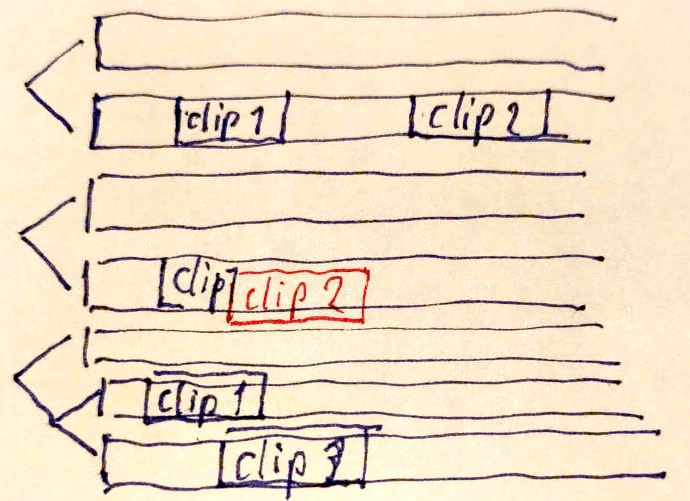
Figure 1. Resolving a collision by shearing aside
What is lost by giving up global tracks: the ability to toggle or mute whole groups of content by track. The replacement follows an audio-workflow insight — routing by → tagging the material.
At FrOSCon-25, a concrete mechanism for controlled layering was discussed: allow the user to configure, per track, that all content stays fixed above a reference clip — promising greater freedom of track arrangement, with the caveat recorded in the meeting summary that practical tests are needed to determine feasibility.
Vertical screen real estate
The hard practical problem inherent in this is the use of vertical screen space. Wouter, who dedicates one monitor exclusively to the timeline in his personal work setup, has expressed his concerns regarding extended nested sequences as follows:
An expanded nested sequence will need vertical space of its own to show its inner tracks. This is space that’s taken for the entire duration of the sequence, even if most of this space might be empty. […] As a result, we will try to collapse the nested sequences whenever we can, at the cost of keeping the overview and at the cost of another gesture that needs to be performed.
eMail 2025-04-08
— Wouter
— Wouter
During the IRC chat, Hermann shared quick sketches indicating ways to approach these problems: a “group clip” is a fork sub-tree in the session model, but its contents could be rendered inline, sharing the surrounding track space rather than opening a separate lane.
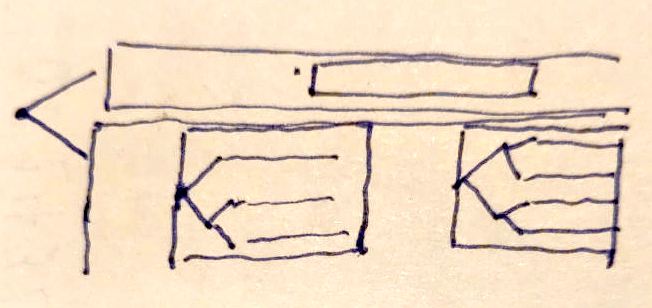
Figure 2. A »virtual clip« with a nested sub-fork
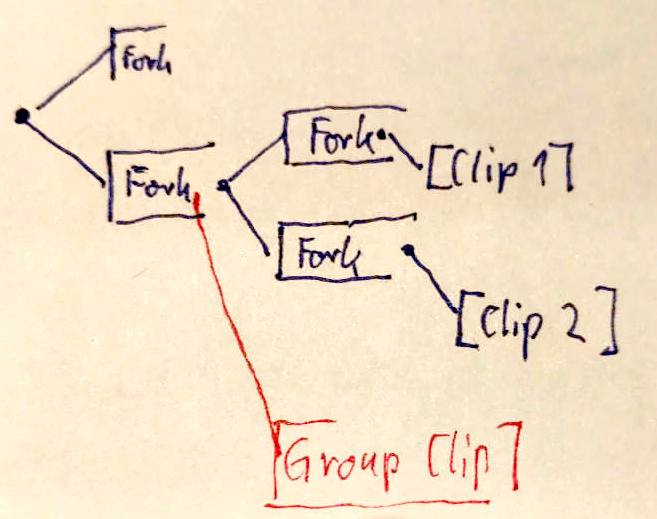
Figure 3. A group-clip (virtual clip) can sit anywehere in the fork
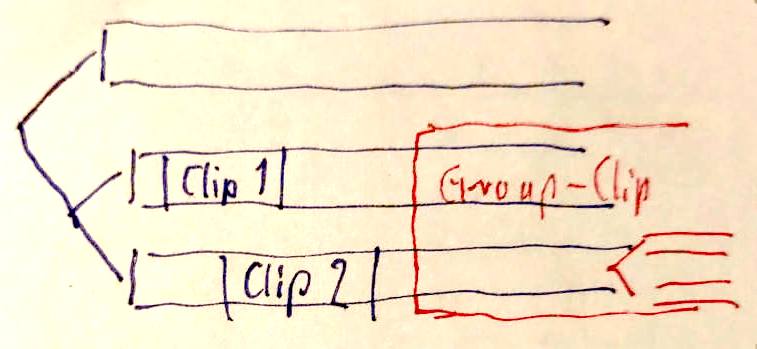
Figure 4. It might be possible to establish common use of sub-tracks…
…however, many aspects of such a feature still need clarification; the merely technical representation within the Session model likely being not the most difficult part… The further ongoing discussion has not yet fully expanded into this topic; it stands as one of the most consequential open areas.
Grouping
Grouping devices: groups, linked clips, nested sequences
The question how to group and encapsulate parts of an edit was identified early as the pivotal decision — “the choices made here will very much influence all other aspects of working in the timeline” (Wouter, eMail 2025-04-02) — and its treatment shows the discussion at its most productive: two independently developed models converged step by step.
Wouter’s proposal
In his document and in the ensuing discussion in April 2025, Wouter proposed grouping as a first-class citizen of the timeline: every clip is part of a group.
[…] I’d like to point out that the way I imagine it now, clips on layers within a group will occupy (or “share”) the same layers on the timeline as the clips from other groups.
In order for this proposal to work, each clip on a timeline should be part of a group. This way there will always be at least one group and the user can choose to append new clips to this group, or to create a new group. If there’s no automatic way for group creation then I think few people will put in the effort to create groups manually (they will just start to cut and not think about it).
Then, within one timeline, the operational hierarchy could be:
-
sections
-
groups
-
clips
-
-
Where clips, as you pointed out, could either contain source clips, or titles, but also other groups/sequences, which can be opened in a timeline of their own (if these too were to be displaying directly in the parent timeline I’m afraid the complexity will get out of hand.)
Moving on to how this could actually work within the GUI: at the moment I think
we will need to provide three modes of operation within the timeline:
connect: none | clips | everything
Or a different name for the same could be:
sync: none | local | global
No sync / connect none: this will practically turn off group boundaries and make the timeline behave similar to Premiere or Resolve (in their default modes/tools). Destructive, yes, but familiar to most editors and it will give users the freedom to move clips wherever they like.
Local sync / connect clips: this will enable ripple trimming and easy reordering of clips within groups. Pretty much like FCP’s magnetic timeline, but per group and actually only per layer within a group (so probably no clip connections here). If the group you’re working in gets shorter or longer, all other groups on the timeline will stay in place.
Global sync / connect everything: this mode will keep everything in sync. If you ripple trim a single clip, the entire timeline, including other groups, will move with it and stay in sync.
About the visual presentation of these modes: what disrupts my workflow in Premiere and Resolve is when I have to take my eyes off the timeline to look for buttons like “linked selection”, to check if this mode is toggled on or off. I would suggest to make it visually clear in the timeline which mode we’re in. No sync would mean not displaying group boundaries. Local sync would mean displaying them as in my mockup picture, and global sync… not sure yet, maybe change the colors of the boundaries?
Groups can be selected by either clicking an empty space within the group (if there is any), or clicking the group header. […]]
I’m thinking we need to have the option for groups to overlap each other without erasing the group or clips that fall underneath.
eMail 2025-04-06
— Wouter
— Wouter
Hermann’s counter-position
Hermann recognised his own plans in the proposal — “what you describe as a ‘group’ would be modelled in Lumiera as a Sequence, with its own track tree, but bound as virtual medium within a clip” (eMail 2025-04-05) — but challenged the fixed three-level hierarchy:
What I rather like to question / criticise is that we have three “kinds of things” here, which are all grouping devices. Sections, groups, clips. Also, the fact that we define a fixed hierarchy bears the danger to go into the direction of a fixed model structure. Could we instead get away with only a single grouping device in the model? […] If we conceptually define our model such that each clip is again a sequence, then we attain full self-similarity and can throw away lots of “special features” present in many audio or video editing software. On the implementation level, the key trick is that you do not need to represent things which are not relevant.
eMail 2025-04-07
— Hermann
— Hermann
Wouter defended the fixed structure as roles rather than kinds — “on a technical level, all three of these could be sequences […] it keeps things simple enough that many actions can be performed fast” — while acknowledging the appeal: “I’m intrigued by your quest for everything to be flexible, but I also wonder if it comes at a cost to the user.” (eMail 2025-04-08)
Convergence
Two weeks later, Wouter proposed a resolution — groups and nested sequences are different things serving different purposes:
[…] you briefly spoke about possibly uniting our approaches to grouping clips, and I am beginning to think that they might actually safely co-exist. Many NLE’s have a feature called “linked clips”, usually used to keep a video and audio clip together through a toggle called “linked selection”. But often you can manually link any combination of clips to treat them as a group. My proposal for group clips might actually be closer related to this linking than to nested sequences, and could perhaps be thought of as an evolution of the linked clips concept. […]
In my proposal every clip always belongs to a group. The moment you add a clip to the timeline your action will decide whether it will be added to an existing group, or if a new group will be created. So I’d like to immediately establish the relations between clips when they are added, and not leave it as a thing to do later. […] This way, the groups and nested sequences can both exist and have their own purposes.
eMail 2025-04-18
— Wouter
— Wouter
The second half of the convergence arose from exploring the consequences of the placement concept: once clips are → connected by placements, grouping emerges from these relations — clips with relative placement act as “group leaders”, and an implicit grouping scheme arises from the direct relationships of neighbouring clips (Hermann, eMail 2025-08-29). Wouter, initially wary of unintended automatic connections, arrived at the same point:
I am in fact very excited by how a timeline with these types of placements might behave and how this would help to bring editing to a new level. I can also see how we might not need too many other grouping devices when groups are built using clip connections.
eMail 2025-10-03
— Wouter
— Wouter
The discussion ensuing after FrOSCon-25 consolidated this line of thought: rather than introducing a dedicated light-weight grouping device, placements can achieve the same effect; what remains unresolved is the visual representation. On that front the discussion has concrete warnings and leads: no NLE offers a model to copy — “we need to write down several ideas and just create mockups” — and colour as visual cue is largely spent already, since clip colourisation is a vital organisational tool for editors; thus lines and borders between or around clips are the more promising direction (Wouter, eMail 2025-08-26).
Placement prototypes and their behaviour
To make placements workable in the UI, the discussion (from FrOSCon-25 onward) settled on offering a small set of placement prototypes — pre-configured placement setups, chosen per clip, adjustable through the contextual tool palette. Hermann prefers the term “prototype” over “archetype”, referencing the prototype-based type systems of JavaScript and Python: a new instance is created by cloning the prototype (eMail 2025-08-29).
The set was worked out in Hermann’s mail of 2025-08-29 and condensed by Wouter (eMail 2025-10-21) to three:
-
Relative to parent — clip anchored to its track (or effect to its clip) with adjustable offset; behaves for all practical purposes like absolute positioning, and can replicate traditional NLE behaviour or truly lock clips in time.
-
Magnetic — anchored at the end of “the preceding element”, without naming it explicitly; the default for a continuous series of clips. A non-zero offset creates a gap — or an overlap, which can be a transition.
-
Content-anchored — anchored to a specific point in the media content of another element (a beat in the music, an action in another clip); technically a point on a “synthetic local time axis”, which extends the concept to any element with a temporal dimension.
Wouter’s design maxim was accepted as guiding principle: “the fewer, the better. Few prototypes will make it easier to understand what is going on, and we’ll need fewer visual cues on the timeline. […] The prototypes you proposed seem sufficient to me, and if not, we can always expand later.” (eMail 2025-10-01)
Behaviour under editing operations
The mail of 2025-08-29 analysed systematically what happens to attached clips when their anchor is edited:
| anchor is… | moved | trimmed | slipped |
|---|---|---|---|
relative (anchor = start) |
attached clips shift by the same delta |
nothing happens (start unaffected) |
nothing happens |
magnetic (anchor = end of predecessor) |
attached clips shift |
end point shifts, attached clips shift — whether trimmed at start or end |
nothing happens |
content-anchored (anchor = point on local time axis) |
attached clips shift |
attached clips shift only if the trim moves the anchor point: trimming the start shifts them, trimming the end does not |
attached clips shift (slipping moves the anchor point) |
The content-anchored case has a remarkable edge: if the anchor point is edited outside the visible part of the anchor clip, it remains mathematically well defined --
So, for example, if the anchor point coincided with the clash of the cymbals in »The Man Who Knew Too Much«, and we edit away that clash from the music track — then, in a strictly mathematical sense, the anchor point as such remains well defined […] so the attached clips should remain anchored to that very point where the cymbals will clash and the murder is expected to happen.
eMail 2025-08-29
— Hermann
— Hermann
Principles established early (IRC 2025-04-16)
The chat session settled ground rules that held throughout:
-
Manipulating a multi-selection with mixed placement types never silently changes the placement kinds — it adjusts offset values only, with the minimum of necessary adjustment, so that “no clip jumps around just wild and uncontrolled” (Hermann).
-
Test case: clips attached to a music clip are box-selected (without the music) and dragged. Comply and adjust their offsets — or refuse to move them? Both agreed on complying; in Wouter’s words, the refusing variant “would lead to agitation”.
-
Locking a clip in place is a placement property, reachable via a properties panel with a visual indication on the clip — rather than many clickable decorations on the clip itself, which Wouter cautioned against.
-
And the reassuring perspective for newcomers: with sane automatic setup and offset-only dragging, “you’d probably not even notice this placement concept at start” (Hermann) — “yes that would be fine” (Wouter).
Requirements for the UI
Early on, Hermann outlined a list of requirements for the representation of placements in the UI, that were elaborated further and confirmed at the FrOSCon-25 meeting:
Just to indicate some (for me obvious) relevant further points to consider:
-
we need a visual indicator for the most prevalent placement modes
-
we need a really well-made placement editor element, which should include some wizzard-like shortcuts, but also allow the user to exert direct control
-
we need to capture the reasoning / the so called »derivation« when resolving a position, so that we can give the user the necessary diagnostics
-
we need to detect when some kind of collision happens in the resolution process and also indicate that visually
-
we need to capture any explicit collision resolution as event, so that it is permanent and can also be reviewed and altered later.
eMail 2025-04-07
— Hermann
— Hermann
Known open edge cases
Wouter’s catalogue of problematic situations (eMail 2025-10-01) stands largely unresolved:
-
Clips moving out of the way to prevent overwrites may break magnetic connections.
-
Swapping a relative-placed clip with a magnetic clip can fling the magnetic clip towards its distant anchor; should placement types swap along — and “would users accept that the software changes their clip settings?”
-
Does a magnetic clip dragged across its neighbour inherit that neighbour’s offset?
-
Track time offsets (as DAWs use for latency compensation): should tracks ever carry them? And what would be the effect of marking such an offset to its nested contents?
-
Deleting an anchor: what happens to attached clips (relative case)? A magnetic clip whose predecessor disappears reattaches to the previous one — but what if there is none?
Sections and the narrative structure of the timeline
In the chapter titled »Organising the timeline: sections«, Wouter’s document proposes to divide the timeline into named sections: mark their headers in the ruler, use background colours for orientation, keyboard navigation between sections — and, crucially, encapsulation for the sake of sync safety: working inside one section cannot throw other sections out of sync; sections can be time-locked (e.g. when cut to music); their order can be changed by drag and drop, so scenes can be rearranged freely — a feature squarely aimed at the free-flowing editor persona; sections could even carry version alternatives of a scene. This proposal carries particular weight for Wouter, and its motivation — a top-level handle on the narrative structure — was emphasised repeatedly throughout the discussion.
At and after the FrOSCon-25 meeting, the alternative approach was explored: implementing sections as a dedicated timeline feature would require considerable effort while not fitting the Lumiera core design as a homogeneous building block. Hermann thus proposed nested sequences as the implementing mechanism — these are already planned for the session model: every such nested sequence has its own track tree; a transition can be built between adjacent chapters while retaining the ability to reshuffle them — “we can thus solve two problems with the same feature”. Since each nested sequence is self-contained, the sync-safety aspect of sections would be achieved as a by-product, while each such nested sequence could again be connected through a suitable placement to some overall global music track.
The cost of encapsulation, however, is opacity — and this is where Wouter’s gravest reservations live:
My second concern has to do with keeping an overview of elements in a timeline that contribute to the actual output. I use a three monitor setup where I always have one screen dedicated to displaying the timeline and nothing else, because seeing what’s there is very important to me. Nested sequences, when collapsed, are black boxes. You can’t see what’s inside until you open or expand them. Nested sequences exist in Premiere and Resolve, yet I rarely use them for exactly this reason.
eMail 2025-04-08
— Wouter
— Wouter
Incidentally, Wouter mentions two exceptions: compositing stacks that are meant to be seen as one clip, and grouped music stems.
The elements of an answer, collected across the discussion:
-
Three graded gestures — expand (reveal internals inline), collapse (show a condensed overview rendering, with thumbnails, produced by Lumiera’s own render engine and cache), and open (to show the contents as a dedicated tab with a timeline created on the fly for the nested sequence)
-
a nested session would be attached into a »virtual clip« — cutting such a clip yields two clips referring to the same underlying sequence (Hermann, eMail 2025-04-07).
-
FrOSCon-25: use a stepwise expansion, so the overall timeline remains balanced, and a condensed preview of a virtual clip’s internal structure, to avoid having to open it in many situations.
-
Wouter’s popup portal idea: hovering a nested clip (or dwelling on it with the keyboard focus) opens, after a brief delay, a popup that acts as a window into the nested sequence — with the mouse, one could even edit its contents directly, without stepping in; though he flagged the misclick risk himself when the popup appears exactly where the user intends to click (eMails 2025-04-18, 2025-08-26).
-
Hermann’s inversion of the question: “in which kind of editing situations do we actually want to collapse a virtual nested clip, as opposed to have it all open for editing like a segment, maybe just slightly condensed vertically?” (eMail 2025-08-29) — which leads directly into the → vertical space problem.
Editing
Adding clips and automatic placement setup
If placements are to carry the editing experience, the decisive moment is when a clip enters the timeline: which placement prototype will it select, and how much does the user have to do about it? This question dominated the last months of the 2025 discussion, and is the point where that discussion eventually paused.
Wouter framed the option space (eMail 2025-10-06): setup by context (the surroundings determine the new clip’s placement), last-used setting, or a fixed default — his least favourite, “because it encourages users to stick with one type as much as possible”. All agree on the goal: “we want whichever option results in the least amount of user actions to get a desired result.”
Hermann invoked the mainstream UI guideline — avoid explicit options if an automatic rule covers most cases and can be adjusted after the fact — and sketched the automatic rule via proximity (eMail 2025-10-08): close to a clip on the left ⇒ magnetic; close to a clip above/below ⇒ content-anchored; else parent-relative. The tuning spectrum ranges from “engage whenever any clip lies in that direction” (which would be acceptable only if the auto mode itself is _gated by a gesture — like switching on a magnet toggle icon and letting things fall into place) to “engage only when really close” — a hooking feature.
Wouter accepted proximity for the magnetic case but drew a line for content-anchoring:
I do think your idea about proximity might work if limited to relative+magnetic: any clip not adjacent to anything else will be relative to parent, any clip that comes after will be magnetic. I think context anchoring should only be applied when you specifically define a target, because you might often have clips above or below that you do not (immediately) want to anchor to. Hooking by hovering will probably be engaged many times by accident.
eMail 2025-10-21
— Wouter
— Wouter
His fallback suggestion — make “parent-relative” the global default, giving near-traditional NLE behaviour for everyone — provoked Hermann’s power-of-defaults argument:
If we make the “parent relative” the default […] then we can expect that most people will setup most of their clips with that mode, and then they need indeed a traditional ripple trim feature. Thus I’m inclined that we should rather try to work out a very good solution for an automatic mode of placement selection, so that most people will end up with almost all clips connected by placements. Just that we can do better here than Final Cut, because we have two flavours to offer (content anchored and magnetic), which seems to cover those important cases with B-Roll and sound effects better.
eMail 2025-11-09
— Hermann
— Hermann
The B-Roll build-up scenario served as recurring proof of concept: the first B-Roll clip becomes a group anchor; further B-Roll material snaps magnetically to its end; sound effects and subtitles are content-anchored on neighbouring tracks; the whole compound can then be dragged as a single entity (eMail 2025-08-29).
The lifetime of a clip
Hermann’s summarised the interaction mechanics discussed thus far, and integrated their use into a state model:
We have defined now several different “mechanics” how clips interact when being manipulated. But we have not decided yet upon the way how to choose between these different possible "mechanics".
Thus I’d like to summarise or list those different mechanics we discussed thus far:
-
the automatic setup mode. You drag a clip and it connects somehow to neighbouring clips. This is also the mode where the idea of “hooking by proximity” could be integrated, if desired
-
the traditional behaviour: each clip is separate and thus gets the “relative to parent track” placement, which behaves effectively as if the clip was just positioned at a fixed point within the track
-
dragging (and even trimming / editing) with placements engaged. If we grab one clip, a whole compound moves alongside. We have discussed several possible flavours, like that you have to grab the group leader, and effects work “hierarchically down” or, alternatively that a compound of clips is glued together, so that you can grab any part to move the whole compound
-
adjusting offsets. When I grab and drag a clip in that mode, it does not change its placement mode, rather it adjusts an offset relative to the existing kind of placement. For example, I could drag away a “magnetic” clip from its left neighbour, and it would still remain magnetically linked, just now with an offset.
-
what happens if we have a multi-selection (either of several clips added explicitly to a multi-selection, or by a box-select)? In theory, we could combine that both with mode (3) or mode (4)
-
(5+3) means that we can mark several clusters and move them together
-
(5+4) means that we can offset several clips by the same amount
-
Expanding onto these ideas and reasoning: a clip would go through several states during its lifetime. When added first, we would be either in mode (1) or when using a modifier/toggle, in mode (2).
Once the clip was dropped onto the timeline space, it has got its placement, and now it would transition either into (3) or (4), again selected by a toggle or modifier system.
And we could have a modifier or function, which brings a clip back into the selection of the placement kind. And then it would probably perform some kind of cycle through the possibilities, as you proposed. And of course, since we show those possibilities also on the tool palette, the user could always just click onto another one.
eMail 2025-11-09
— Hermann
— Hermann
And those stages will mesh up: a clip lifted out of the timeline is again an isolated clip in hand, “as if we’d picked it from the media bins” (eMail 2025-12-07).
The distinctive gesture
Both agree that plain hovering cannot trigger anchoring — “it must be a distinctive gesture” (Hermann, eMail 2025-12-07). Three candidate designs are on the table:
-
Context rule at drop location only (Hermann): very close left predecessor ⇒ snap magnetically; clip on the immediately adjacent track ⇒ content-anchor; correct afterwards via the palette.
-
The hooking gesture (Hermann, preferred by him): default is parent-relative; while dragging, moving over a target clip merely highlights it — but a marked change of the horizontal movement direction right above it (“hook it in there!”) triggers the attachment, confirmed by an overlay, after which the clip is dragged on to its destination. Additionally: dropping a clip directly onto the seam between two clips inserts it in-between, connecting all three magnetically. Wouter: “This is an interesting idea, although quite unconventional. I would like to try this (in whichever way possible), to see how that would feel.” (eMail 2025-12-11)
-
Arrow connect (Wouter): after dropping a clip onto another clip, an arrow appears between them, the dropped clip sticks to the mouse, and a click places it at its intended position — a two-step process, but triggered only in that specific constellation (eMail 2025-12-11; thereby refining his earlier idea of an arrow anchored to the new clip, from eMail 2025-11-25).
Moving, rearranging and ripple behaviour
Given connected clips, what happens when you drag one? Hermann initially framed three variants — (a) only the dragged clip moves, adjusting its offset; (b) the whole magnetically linked compound moves; (c) additionally, content- anchoring anchors move along, so that relative-placed clips act as group leaders of implicit bundles — and proposed modifier-selected sub-modes with (c) as default: grab a bundle anywhere, and it moves as a whole, within its wiggle room (eMails 2025-08-29, 2025-10-04).
Wouter’s counter-model proved to be the breakthrough:
It wouldn’t be detached, it would follow a hierarchy. Parents move children, but not the other way around. This way magic or no magic depends on placement, not on modifier or mode. […] When we do want to move the entire group, we can simply move the group leader. Everything else will move with it. It just needs to be visually clear which clip is that group leader.
eMail 2025-10-04
— Wouter
— Wouter
Hermann adopted it on the spot: “Hey, that’s brilliant, I didn’t see this as a possible concept […] Hierarchical is more generic and encompasses that case, you just need to grab the right thing.” What remains from the modifier idea is the temporary detach: a modifier (or toggle) to move a clip or selection as an isolated case, ignoring its connections — analogous to Final Cut’s tilde key and the classic “linked selection” toggle (Wouter, eMails 2025-10-01, 2025-10-04).
Collisions: block or make way?
Enumerating the logical possibilities for one clip moved into another — block; push aside; overlap above/below; shear aside into adjacent track space; repel and flip order — Hermann proposed “no magic” as default: move within free space, block on obstacles, and never reconfigure things or create chains of secondary ripple effects without an explicit indication by the user (snapping-resistance and tear-away being the familiar analogy). Wouter pushed back hard:
I don’t think blocking is a good idea. Let clips move to another track. At the very least, let a user push through a blockade. Adobe Premiere has blocking behavior in its trimming system and it’s annoying. There’s a reason I’m trying to do something, so the app shouldn’t tell me “_no_”. DaVinci Resolve never blocks. It “understands” what I’m trying to do, and it figures out a way to let me do it in a way that makes sense in relation to the rest of the timeline. This saves a lot of hassle with turning sync locks on and off. I strongly prefer that.
eMail 2025-10-04
— Wouter
— Wouter
Hermann acknowledged the concern without conceding the default (“A very valid point. I do not know if I agree to it, really. Could be!”); Wouter suggested trying Kdenlive’s default mode as a specimen of blocking behaviour. The question — and the related one whether clips move out of the way during a drag (risking broken magnetic connections when they do) — remains open.
Reordering
A load-bearing workflow requirement still lacks its mechanism: easy reordering of clips, FCP’s signature move (drag a clip elsewhere; the rest makes space; the gap closes). Under pure placement semantics, dragging a magnetic clip moves everything attached behind it — useful for trimming, but not what reordering wants: “While a user might want magnetic placement for trimming, they might not want it for moving clips. So we need to distinguish: dragging while respecting all placements — and dragging while ignoring the selected clip’s children.” (Wouter, eMail 2025-11-25) His earlier question marks the same spot: if moving the anchor moves the attached clips, “wouldn’t moving them reorder their positions? […] If not done by moving magnetic clips, how else could we reorder?” (eMail 2025-10-01)
The modifier budget
Modes and modifiers are “a very limited resource” (Hermann, eMail 2025-10-04);
Wouter began the bookkeeping (eMail 2025-12-11): keep Shift ≙ add to selection
and Alt ≙ duplicate for convention’s sake; Ctrl becomes “the common modifier”
switching to the alternative behaviour shown on the contextual palette
(the Gimp pattern, → tools and modes); Avid-style snapping can be
a toggle instead; Premiere’s Ctrl-box-select-of-cuts is probably dispensable.
Terminology and adjacent decisions
Some terms were explained and settled (Wouter, eMail 2025-12-11):
- Lift
-
take a clip out and leave a gap
- Extract
-
take it out and close the gap
— with Wouter defending the usefulness of lift-with-gap in track-based contexts (protecting timings until the gap is closed deliberately).
Also settled en passant: dropping a clip from the bin onto an existing timeline clip will replace the target, taking over position and connections, with the length adjusting to the new clip (eMails 2025-10-05/06).
Furthermore: no brick wall at timecode zero — Lumiera is not based on timecode internally (rather on an opaque 64-bit µs-granularity time — timecode is mere presentation), so negative positions are unproblematic and the user can relocate the zero point on the time ruler when required.
Ripple trim — parked
Wouter repeatedly noted that a general ripple-trim function would be “handy in any case”, to serve users replicating traditional behaviour. Hermann sees classic ripple trim as a workaround “for lack of a better alternative, since the user needs a way to keep sync between adjacent tracks, without having proper means to define the relationship between these tracks” — and thus implementing ripple-trim would introduce a duplicated behaviour pattern, yet subtly deviating from what placements provide (eMail 2025-11-09). Outcome: “I understand your reasoning for not wanting a ripple function, so let’s park that for now.” (Wouter, eMail 2025-11-25)
Trimming
“Trimming is a topic in itself, one of the most complex indeed” (Wouter) — “yes, but it is the very heart of an editor’s work. Thus for me it is the litmus test.” (Hermann, IRC 2025-04-16). Both also agree on its systematic priority:
This does require us to decide on a trimming system though, which is a complex topic by itself. Because once we understand how we would like trimming, navigation, arranging, grouping, adding and removing clips will work, we will know which gestures we need for those, and then see how similar gestures will work in other panels and contexts. […] I’m inclined to have the timeline operations take the lead here, and then adapt to other panels (or “extract” general gestures out of these), because the timeline is the one area that can not be compromised.
eMail 2025-04-25
— Wouter
— Wouter
The IRC chat explored the mechanics of trim-side selection: most NLEs select a cut (nearest the playhead) and pick its A or B side; only Lightworks selects the side of an underlying clip.
Wouter prefers the clip-based approach — “since we already have a mechanism for navigating clips, we should probably not add another mechanism just for navigating cuts” — and his document turns this into a concrete proposal: three commands on the selected clip (select in point / out point as trim side; select in point for a roll edit, toggling to the out point on second press), with repeated presses switching between ripple and non-ripple trims. Trimming itself “doesn’t need to be reinvented”: frame-wise, by fixed amounts, or dynamically through playback. Since the trim keys collide with clip-nudge keys, a trim mode is accepted — yet would be designed as a contextual mode (→ tools and modes): entered by selecting a trim side, exited by clicking empty timeline space or the mode key; playback in trim mode always previews the selected cut, Avid-style. At FrOSCon-25 the sub-mode arrangement was agreed upon: switching between trim, roll, slide and slip happens on the tool palette after activating the edit tool.
Two connections to the placement concept deserve emphasis:
-
Wouter’s document proposal renounces sync locks — “we previously established that clips that have no relation to each other might share a track, so it makes little sense to provide track based operations. We should instead take the actual clip connections that the user establishes into account.” This effectively applies the placement patterns onto the trimming behaviour, and quietly removes most of the need for multi-trim-side asymmetric operations.
-
The behaviour of connected clips under trimming is what was outlined in the → prototype behaviour matrix — e.g. trimming a magnetic chain ripples by construction, no no sync-lock is required.
In the mail discussion proper, trimming was touched frequently, but never given its own deep dive — Wouter’s mutually-exclusive-selections question is still standing: should clip selection and trim-side selection exclude each other (saving precious keys), and how does that interact with sticky selections without introducing yet another mode? (eMail 2025-04-25)
State of the discussion
Looking back over the year, the discussion has produced a remarkably coherent body of design: a shared vision (flow, trackless aspiration, medium abstraction), a settled conceptual core (three placement prototypes, grouping through connections plus nested sequences, the contextual tool palette, the gesture concept with its two-priority feedback scheme), and a set of working principles
-
minimise the number of design elements
-
map down / simplify down to known software behavior
-
the Gimp modifier pattern
-
modifiers as limited resource
-
power of defaults
The discussion paused in December 2025 when discussing the choice of the concrete mechanism for attaching clips while → adding and arranging them — and this opens a well-delimited frontier of further questions to explore.
The largest uncharted areas are Routing (tagging, layering), the vertical-space, grouping and sections cluster of topics, and a systematic treatment of trimming.

|
A separate page compiles these open points into a selection for a possible working agenda for the planned meeting at FrOSCon 2026. |